What’s In A Document Comparison
Comparison is a Spatial and Reading Problem
In 1992, Andrew Dillon published a review of the empirical literature on reading from screens versus paper that should have changed how legal comparison software was built.
Dillon found that reading from screens was slower, produced lower comprehension, and generated more subjective fatigue than reading from paper. The problem was about spatial memory. When humans read a physical document, they encode information relative to its physical location — top of page, halfway through, the last section before the thick remaining stack. They know where they are. They know where they've been. Electronic text, particularly the scrolling interfaces of early word processors, destroyed that cognitive map entirely — "getting lost in hyperspace."
How do we help humans navigate a wall of text in order to reduce cognitive load?
The 30 Year Comparison Standard
Litera Compare — which was then DeltaView, built by Workshare — was developed in the 90s to solve that comparison reading problem.
Since then, and through decades of refinements, Litera Compare has become the de facto standard for document comparisons for the legal profession. Two documents, clear blacklines — lawyers trust and use this output. The spatial cues are the red, blue and green colored text. Reading order is intact. The cognitive load of parsing changes is managed well enough that a lawyer can move through a document and build a coherent mental model of what shifted and why.
One-to-one document comparison become a solved problem.
The world, however, kept moving.
Lawyers Now Want More
Legal work now routinely involves comparing not two documents but many. Franchise agreements across a portfolio. Fund documents across vintages. Employment contracts across jurisdictions. Credit agreements across transactions. The question is no longer "what changed between draft three and draft four" but "where does this set of 30 documents diverge, and which ones are different".
That is a categorically different cognitive task, and we built the Super Comparer to solve it in 2023.
When we set out to solve it, the logical answer seemed obvious. Multiple documents, multiple columns. A spreadsheet-style grid where every document is visible, every clause is aligned, and the reading order is retained. The full picture is on screen, all at once.
Super Comparer worked perfectly… for 20% of users.
The other 80% of users found the Super Comparer’s grid hard to read. The cognitive load was too much.
The Minority Versus the Majority
Observing the usage patterns, we surmised that 80% of lawyers need something other than a grid. It was not because the information was wrong — it was precisely because it was correct and complete — the grid implicitly asked lawyers to become a different kind of reader. We were implicitly asking every user to read like accountants.
A grid is a two dimensional dataset, not a one dimensional document. And most lawyers are not trained to read across dimensions. They are comfortable reading documents, sequentially, building a mental model as they go.
Completeness is a false god. 80% want ease of readability above completeness of data.
In the last six months, our mission became answering the question of how we can compress the output for a multi-document comparison for the majority of lawyers. What was an acceptable loss of precision? What was noise? What was signal?
We knew that the majority of lawyers do not care for formatting and structural changes (EDIT: they don’t care for formatting at the time of reviewing changes, i.e. don’t show them bubbles in Word). We knew that reading order was integral. We knew how to strike text at a phrase level, rather than at a character level.
The hypothesis is that retaining reading order and giving spatial cues outweigh information completeness. So, we decided to work on a Word output. Take the analysis the Super Comparer runs across multiple documents, compress it intelligently, and deliver it in a clean docx that a lawyer can open and move through top to bottom. Word is the cognitive interface lawyers already know. It was the document format their spatial memory can navigate.
The Old Way is the New Way
The on-ramp onto the Super Comparer will likely stay the same. Documents go into the tool via the web app and via email.
At the off-ramp:
The 20% go to the grid. Those lawyers want the full picture, all the data, maximum precision. They are comfortable navigating a spreadsheet and they use it well.
The 80% go to Word. These lawyers want a document they can comprehend. They will trade some precision for that, and they make that trade without hesitation.
The outputs serve different cognitive preferences.
For one to one comparisons, we already give lawyers a docx output of the changes marked up in reds, blues, and greens. And in Q3, our Word docx off-ramps will grow to include two new modes:
A multi-merged docx format will bring multi-source synthesis into a single clean Word output, like the old Macro.com — the analytical work of comparing across many documents consolidated in the reading format the majority of lawyers are happy to use.
A statistical anomaly heatmap in docx format will surface the outliers directly into the document, in reading order, without requiring anyone to navigate a grid to find them. The pattern recognition power of the spreadsheet view, delivered through colored highlighting.
Dillon's answer was about spatial memory and cognitive load. We believe the answer is not a new interface. It is about delivering information in a UI lawyers already know.
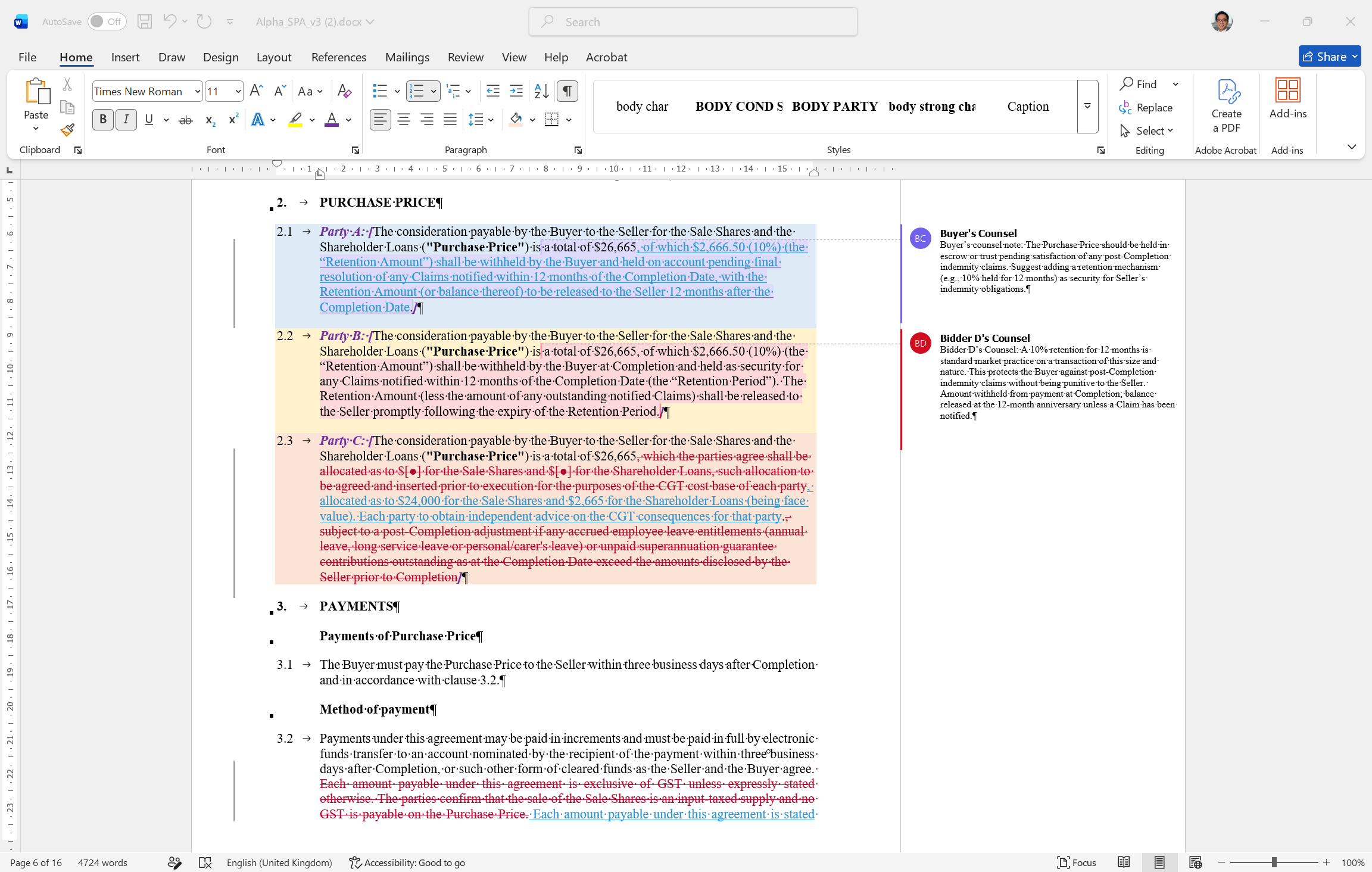
Mockup of our multi-merged docx
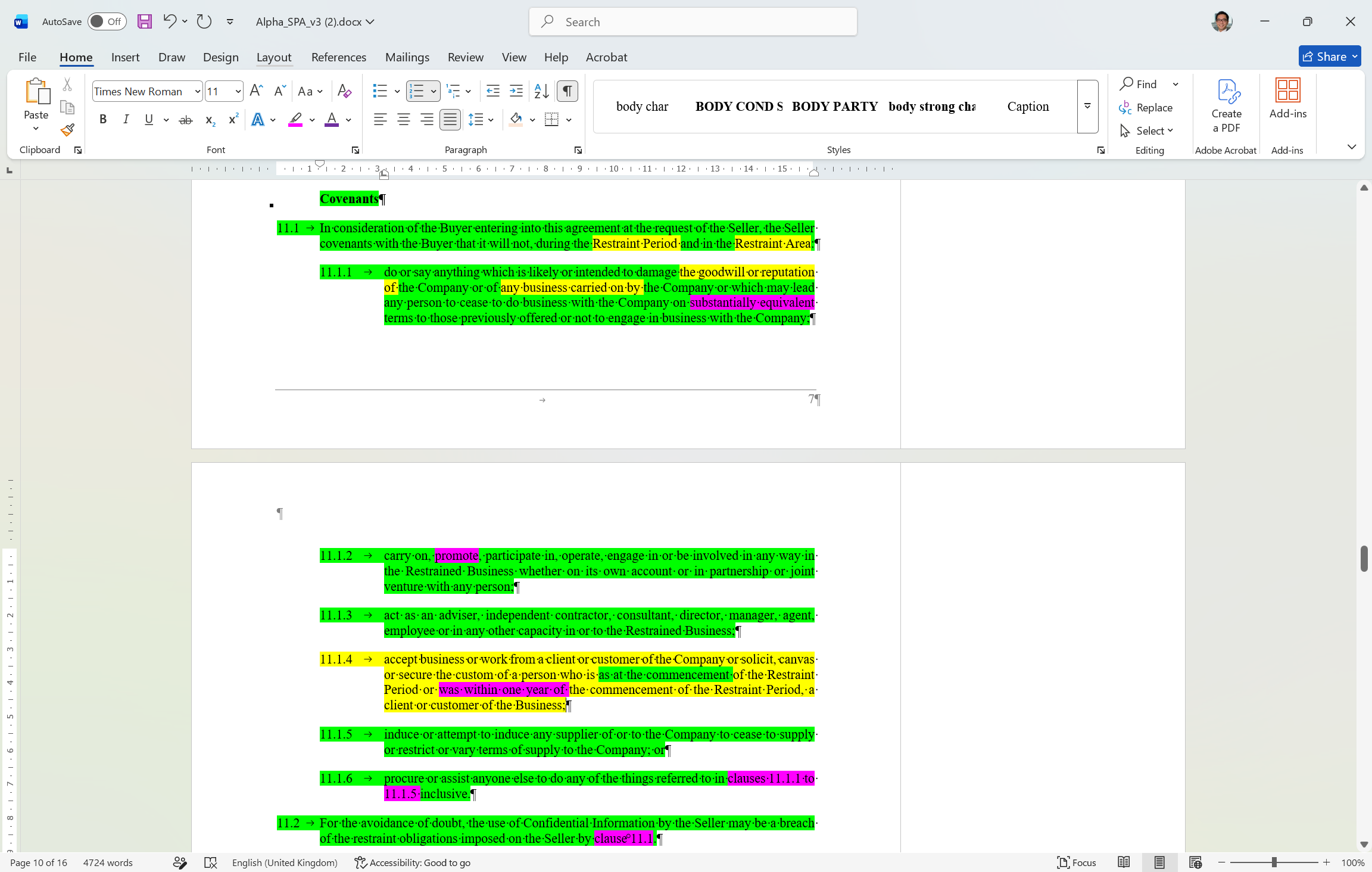
Mockup of our anomaly heatmap docx